- You are here:
-
Home

- FAQ
FAQ
If you wish to send us locations of aqueduct remains, or the trace of an aqueduct on the ground, you can send us a drawing or map, but the best and easiest way is do to mark locations or traces of aqueducts in GoogleEarth. This is done as follows, once you have installed GoogleEarth on your computer:
Enter a location
- Open Google Earth
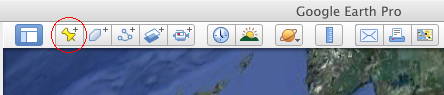
- to enter an element as a single point, called a "place mark" in Google Earth, click the yellow pin in the bar above the Google Earth Window. The pin will appear on the Google Earth Globe and a window will open where you can enter your data; zoom in on the map until you can recognise features in the area where the element is located, and drag the pin to the right position. If you know the coordinates, you can also type those in and position your pin this way.
- press "description" and enter the name of your element under "Name", and insert the text you want to give to describe it in the field "description". Here you could describe the item, give measures, references etc.
- check that the pin is the right position, and if so, press OK.
The placemark will now appear in the "places" list at the left side of the globe. When you prepare several elements, please add a Folder under the Google Earth menu "Add" and place all your elements in the folder by dragging them in.
- if you have saved your element, but want to make further changes, edit it by clicking on it in the "places" list with the right mouse button. Alternatively, you can click on it with the right mouse button in the map itself, and choose "get info" in the dropdown menu.
- remove elements by activating them, then press "delete"
- save what you did under "file>save>save my places". Note that GoogleEarth does not automatically save your work.
Drawing an aqueduct track
Drawing an aqueduct track will be done by the ROMAQ team, using the data you provide, but in some cases, e.g. if you can remember the locations in the terrain, but cannot find it on a map, it may be better if you draw sections of the aqueduct yourself. You can proceed as follows:
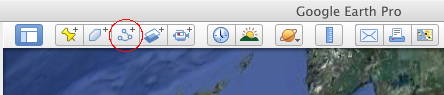
- click the three blue dots in the bar above the Google Earth Window. This will create a "path"
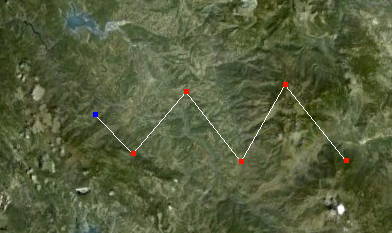
A white square will appear on the Google Earth Globe as a cursor; enlarge the field of view until you can recognise features in the area where the element is located, and click to outline your aqueduct path. Active nodes are blue, and you can drag these around; activate other nodes by clicking on them with the mouse. You can add nodes in the line by clicking, activating the node next to the place where an extra node is needed (in fact, before it in the sequence in which the nodes were first inserted). You can remove active (blue) nodes with the right mouse button.
- press "description" and enter the name of your aqueduct under "Name", and insert the text you want to give to describe the aqueduct it in the field "description"
- check that the aqueduct path is the right position, and if so, press OK.
The aqueduct track will now appear in the "places" bar at the left side of the globe as a white triangle. You can add a Folder under the Google Earth menu "Add" and place all your elements in the folder by dragging them in.
- if you have saved your aqueduct, but want to make further changes, edit it by clicking on it in the "places" bar with the right mouse button. Alternatively, you can click on it with the right mouse button in the map itself, and choose "get info" from the dropdown menu.
- remove paths by activating them, then press "delete"
- save what you did under "file>save>save my places". Note that GoogleEarth does not automatically save your work.
Saving and sending
Once placemarks, polygons or tracks are complete and stored in a folder, please select the folder in the "Places "list at left and save it under "File>Save>Save Place as". Save the folder as a .kmz or .kml file. Send this file to APRA as an attachment to an email. In the email, you can give further explanation. We will add the material to the existing databases, with a reference to your contribution as an acknowledgement. Any photographs you send remain your property and under your copyright.
ROMAQ emails:
This email address is being protected from spambots. You need JavaScript enabled to view it.This email address is being protected from spambots. You need JavaScript enabled to view it.
Postal Address:
ROMAQProf. Cees W. Passchier
Tannenstrasse 7
55576 Zotzenheim
Germany
Fax 1:+49-6701-901803
Fax 2+49-6131-3923863
What we need for ROMAQ are data as described below. We realise that you may not have all of this, and the list is only meant as a mnemonic, to indicate what we would like to use in ideal cases. In fact, any info that you can send us is useful for us. It will be transferred into our ROMAQ website, and to the Filemaker database on which ROMAQ is based. The language of ROMAQ is English, but you can fill in the data in any language that we can handle comfortably, i.e. Dutch, German, English, French, Italian, Spanish, Catalan, Portuguese and Turkish
- relevant literature. Best are PDF files of articles, or .jpg or .tiff files of individual pages, or also photocopies to be sent to our mail address
- large scale data on the aqueduct such as length in km, dimension of the specus (width and height), estimated delivery volume (cubic metres/day), and gradient
- data on elements of the aqueduct, such as type of source (spring, river, dam, lake,...), name and location of the source, capacity of the source now (m3 per day), shape of the specus ( masonry canal, tubes, etc), shape of the specus covering (half -circular vault , cover slabs), presence of special elements (siphons, tunnels , bridges), presence of basins and presence of sinter in the specus
- a short description of remains that can still be seen, and where they are, including the type of element (specus remains, wall, bridge, basin, etc), a short description, GPS coordinates or indications of locations and a map or .kml or .kmz file showing the position of the remains
- photos of the remains – these will only be used for a better description and not be published, except when it is needed for the website and if the owner gives permission.
Because the structure of the database should be uniform, we decided against a platform to upload data directly. However, we do welcome any input for the database. We prefer published data and theses to unpublished material. In some cases, where no published material is available, we have also included unpublished manuscripts and maps
Any relevant data or proposed changes should be sent to the ROMAQ office, either by email or on paper. For large files, please use one of the transport file sites like mailbigfile (http://www.mailbigfile.com/ ), transferbigfiles (https://www.transferbigfiles.com/) or yousendit (https://www.yousendit.com/).
We prefer to refer to data published in books and journals for the simple reason that it is permanent; websites may contain very interesting and reliable material, but they commonly disappear after a number of years, or their content is changed. We do refer to important websites in the database, though.
We presently have references in 23 languages, and it would be nice to present this material in the same languages on the site. For practical reasons, however, we have decided to make English the core language of the database.